
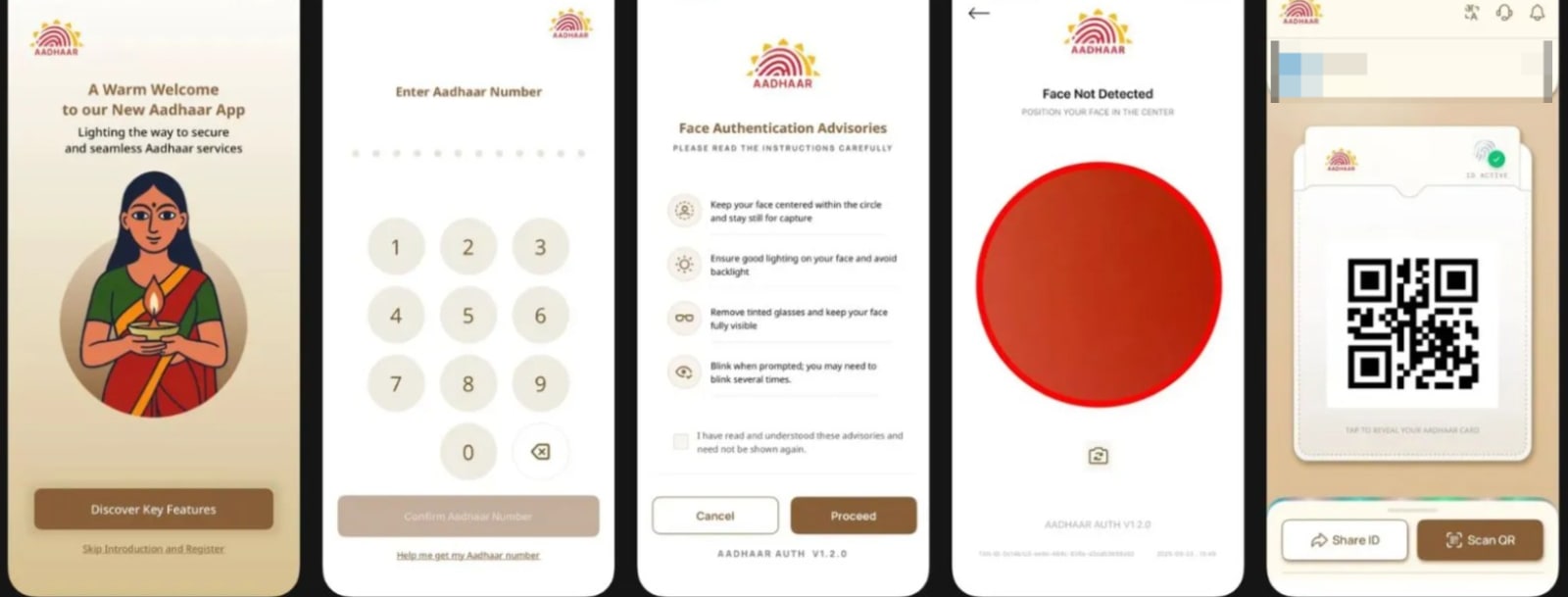
A Smarter Way to Use Aadhaar
Aadhaar has become part of daily life in India — banking, SIM cards, travel, offices, and government services all rely on it. Yet, many people still carry physical Aadhaar cards or hand over photocopies, exposing sensitive personal data.
To solve this long-standing issue, UIDAI has launched a new Aadhaar app designed to give users full control over their identity from their smartphone. The app reduces paperwork, minimizes visits to Aadhaar centres, and introduces safer ways to verify identity.
What Is the New Aadhaar App?
The new Aadhaar app is a digital identity management tool developed by UIDAI. It allows Aadhaar holders to verify their identity, update details, and share information securely — without revealing more data than necessary.
Unlike earlier solutions, this app focuses heavily on privacy-first verification, meaning your Aadhaar number and biometrics are not exposed during routine checks.
Key Features of the New Aadhaar App
🔐 Offline Aadhaar Verification
One of the biggest upgrades is offline verification. You can now confirm your identity without internet access and without sharing your Aadhaar number. This makes the app ideal for hotels, offices, or local verification needs.
📤 Selective Data Sharing
Instead of sharing your full Aadhaar details, the app lets you choose exactly what information to share, such as:
- Name only
- Age range
- Address confirmation
This prevents unnecessary data exposure and lowers the risk of misuse.
📱 Mobile Number & Address Update from Home
Updating Aadhaar details has traditionally meant long queues and appointments. The new app allows users to:
- Change their registered mobile number
- Update address information
All directly through the app, with digital authentication and a small service fee.
👨👩👧 Multiple Aadhaar Profiles
The app supports up to five Aadhaar profiles on one device, making it easier for parents or guardians to manage Aadhaar details for children or elderly family members.
🪪 Aadhaar Contact Card
This feature lets you share verified contact details securely, without revealing your Aadhaar number or downloading documents.
How to Download the Aadhaar App
- Open Google Play Store or Apple App Store
- Search for “Aadhaar – UIDAI”
- Install the official app
- Select language and complete setup
- Log in using Aadhaar authentication
Once logged in, all Aadhaar services become accessible from the home screen.
How Offline Aadhaar Verification Works
The app offers two simple offline methods:
1. Share ID File
You can generate a secure Aadhaar file protected with a password and share only selected details required for verification.
2. QR Code Verification
The verifier displays a QR code, which you scan using the Aadhaar app. Verification happens instantly — no documents exchanged.
How to Update Mobile Number or Address
- Open the Aadhaar app and log in
- Tap Update Aadhaar Details
- Choose Mobile Number or Address
- Enter new details
- Complete authentication steps
- Pay the applicable fee
- Submit the request
Once approved, your updated details are reflected in the Aadhaar database.
❓ Frequently Asked Questions (FAQs)
Q1. Do I still need to carry my Aadhaar card?
No. The app can be used as a digital alternative for most verification needs.
Q2. Is the app safe to use?
Yes. UIDAI has built the app with encrypted data sharing and limited disclosure features.
Q3. Can I update Aadhaar without visiting a centre?
Yes. Mobile number and address updates can be done directly through the app.
Q4. Is this app different from mAadhaar?
Yes. The new Aadhaar app is more advanced and is gradually replacing older solutions like mAadhaar.
Q5. Is there a fee for updates?
Yes. A nominal charge applies for updating Aadhaar details.
🧾 Conclusion
The new Aadhaar app represents a major step toward digital convenience and data privacy in India. By allowing offline verification, selective sharing, and at-home updates, UIDAI is reducing dependency on physical documents and manual processes.
For Aadhaar holders, this means fewer visits to centres, better control over personal data, and a safer way to prove identity. If you use Aadhaar regularly — which most Indians do — this app is worth installing.